Scrapbook Photo Layouts: Arranging One to Six Photos on a Page
Arrangements that suit one, two, three, four and up to six photos on a single page, with the spacing and cropping each one needs.

The number of photos decides most of a page before any paper is chosen. Scrapbook photo layouts for one picture, three pictures and six pictures follow different logic, and an arrangement that flatters a single large print looks cramped when five more are squeezed around it. Count the photos first, then pick an arrangement built for that number.
The sizes below assume a 12 x 12 in (30.5 x 30.5 cm) page and standard 4 x 6 in (10 x 15 cm) prints, some of them trimmed smaller. On smaller pages the same arrangements work with fewer or smaller photos.
Two rules for any number of photos
First, group the photos into one block instead of spreading them around the page. Photos that sit close together read as a single shape, which leaves clear space elsewhere for the title and the journaling. Scattered photos break the page into small leftover gaps that are hard to use.
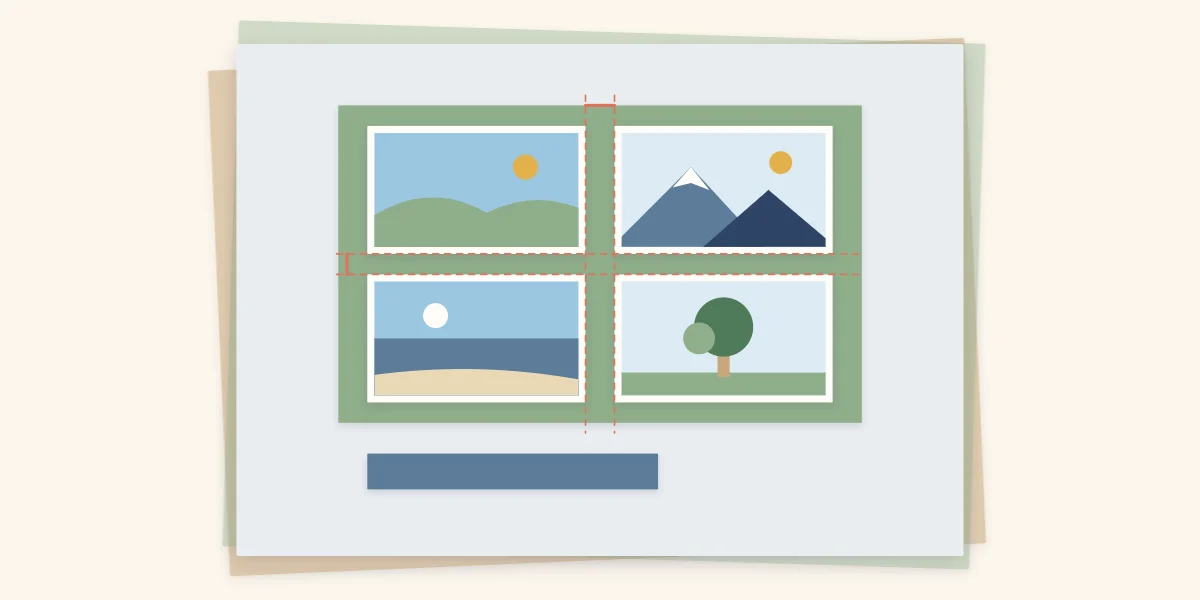
Second, keep the gaps inside the block equal. A gap of 1/4 inch (6 mm) between every photo, both across and down, looks deliberate. Gaps that vary by even a small amount look like a mistake, because the eye compares them directly. Cut a strip of scrap cardstock to the gap width and use it as a spacer while you glue.
One photo
A single photo carries the whole page, so give it size and a mat. Leave a 4 x 6 in print uncropped, or use a larger print if you have one, and place it slightly off-center rather than in the exact middle. An off-center photo leaves one larger area of open space, which is the natural home for the title and journaling.
The risk with one photo is a page that feels empty. Solve it with layers of paper behind the photo, not with more embellishments scattered across the background.
Two photos
Two photos work in three ways: side by side, stacked, or overlapped at one corner. Side by side suits two vertical prints; stacked suits two horizontal ones. In both cases align the outer edges so the pair forms a rectangle.
If one photo matters more, make it clearly larger. Two photos that are almost the same size look like an error in cutting, while a difference of about half is obviously intentional.
Three photos
Three is the easiest number to arrange well. A row of three across the page or a column of three down one side both give a strong line with room beside it for words.
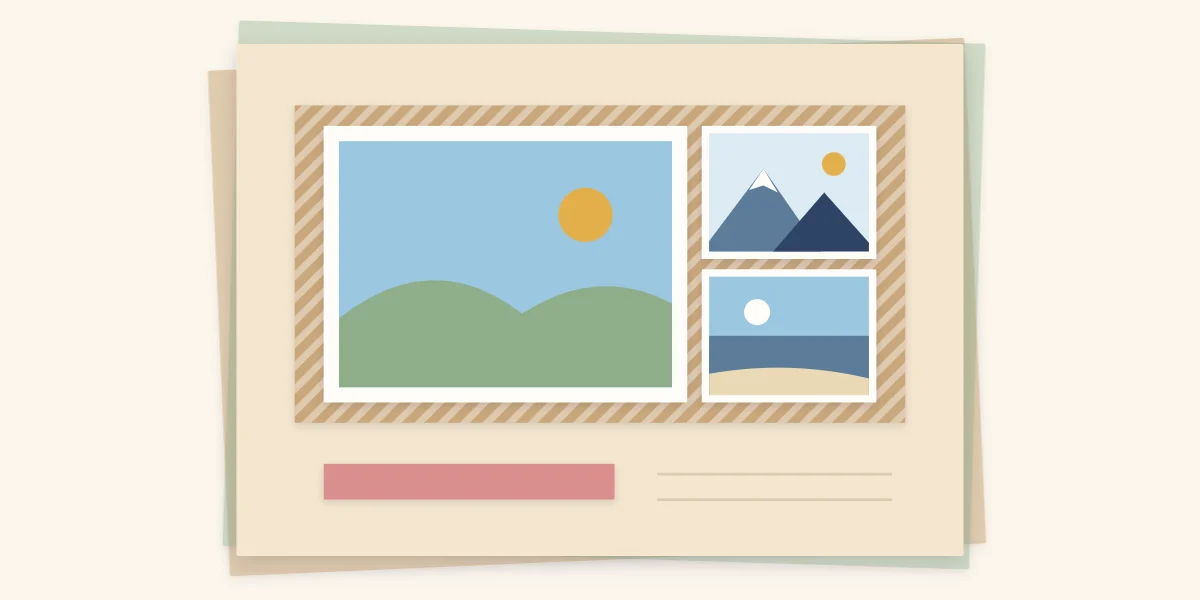
The most useful arrangement is one large photo with two small ones stacked beside it. Trim the two small photos so that their combined height, plus the gap between them, equals the height of the large photo. The three then form one neat rectangle with a built-in focal photo. For example, a large photo 6 inches (15 cm) tall pairs with two small ones that are each just under 3 inches (7.5 cm) tall.
Four photos
Four equal photos in a two-by-two grid is the classic answer, and it is hard to get wrong as long as the gaps are even. Trimming all four to the same size matters more than which size you choose; squares of 3 or 4 inches (7.5 or 10 cm) both fit comfortably with space left for a title.
A grid treats every photo as equally important. If one of the four deserves more attention, switch to one large photo with a row of three small ones underneath, trimmed so the row is exactly as wide as the large photo.
Five and six photos
With five or six photos, cropping is no longer optional. Full-size prints will not fit with any breathing room, so trim most of them to small squares or narrow rectangles and keep only one at a larger size. The guide to cropping and matting photos explains how to trim without losing the subject.
Reliable arrangements include a grid of six in two rows of three, a large photo with a strip of four small ones, and a band of small squares running the full width of the page. Skip individual mats at this point. Mount the whole group on one shared mat instead, which keeps the block tidy and saves space.
Tip
If six photos still feel crowded, the page is telling you something. Remove the weakest one, or move to a spread; the guide to two-page layouts shows how to divide photos between facing pages.
Arrangements at a glance
| Photos | Arrangement | Cropping needed |
|---|---|---|
| 1 | Single photo, off-center, layered mats | None |
| 2 | Side by side, stacked or overlapped | Little; match one dimension |
| 3 | Row, column, or one large with two small | Trim two to fit the third |
| 4 | Two-by-two grid, or one large over three small | All four to one size |
| 5 to 6 | Grid of six, large photo plus strip, or band | Most photos trimmed small |
Before you glue
- Arrange the trimmed photos on the background without adhesive.
- Check that the outer edges of the block line up on all four sides.
- Check the gaps with a spacer strip.
- Make sure the block leaves one clear area for the title and journaling.
- Mark the corners of the block lightly in pencil, then glue the photos down one at a time.
Where the block sits on the page is a separate decision from how the photos sit within it; the guide to page composition covers placement and open space, and the list of scrapbook page ideas for a blank page offers more arrangements to try. If the difficulty is having too many good pictures to begin with, start with the advice on choosing photos from a big stack.
Frequently asked questions
How many photos should go on one scrapbook page?
One to four photos fit a 12 x 12 in page easily, and five or six fit if most of them are trimmed small. Beyond six, the page usually looks crowded, and a two-page spread is a better choice.
How much space should there be between photos?
A gap of about 1/4 inch (6 mm) works well inside a group of photos. The exact width matters less than keeping it the same between every photo, across and down. A strip of scrap cardstock cut to the gap width makes a handy spacer.
Do all the photos on a page need to be the same size?
No. A grid of equal photos gives every picture the same importance, while one large photo with smaller ones around it creates a focal photo. Either works, as long as the outer edges of the group line up into a clean rectangle.