Common Scrapbooking Mistakes and How to Fix Them
Crowded photos, scattered embellishments, uneven gaps and missing journaling are the usual problems on early pages. Here is what each one looks like and how to repair it.

Most common scrapbooking mistakes come from the same two habits: putting too much on the page, and sticking things down before the arrangement is settled. Neither needs new supplies to fix. They need a slower order of work and a willingness to leave some cardstock empty.
The problems below are the ones that show up most often on early pages. Each one comes with what it looks like, why it happens and a specific repair, including what to do when the page is already glued.
Crowding too many photos onto one page
A stack of prints from one event feels like it all belongs together, so every print goes on the page. The result is a layout where photos overlap, nothing has a mat, and there is no room left for a title or journaling. The eye has nowhere to land because every picture is competing at the same size.
Pick one focal photo first and make it the largest thing on the page. Add supporting photos only while there is still a clear gap around each one. On a 12 x 12 in (30.5 x 30.5 cm) page, three to five standard prints is a comfortable range; more than that works better as a grid of small trimmed photos or as a spread. If you struggle to cut the stack down, the method in choosing photos for a scrapbook sorts prints into keep, maybe and leave-out piles before you start.
Scattering embellishments instead of clustering
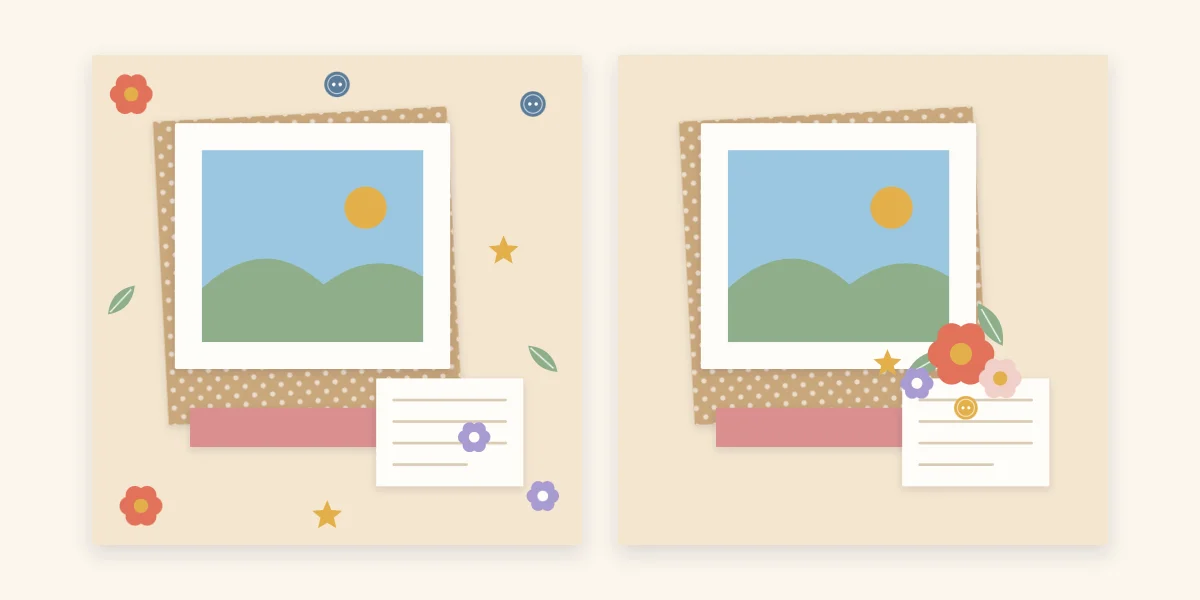
When a page looks bare, the instinct is to fill each empty area with one small thing: a button here, a flower there, a star in the far corner. Spread evenly like that, embellishments read as dots of noise. They pull attention away from the photo and toward the edges of the page.
Gather the same pieces into one cluster that touches the photo or its mat, usually at a corner. Overlap the pieces slightly, put the largest at the bottom of the group and let one or two small ones trail off. The page gains a decorated spot and a quiet area, and the contrast between the two is what makes the decoration look intentional.
Crooked photos and uneven gaps
A photo that sits a few degrees off level looks like an accident, and so do gaps that are wide on one side and narrow on the other.
Use the page edge as your reference. Measure from the edge of the cardstock to the edge of the photo at two points and adjust until both match. For rows and grids, cut a strip of scrap paper to the width of the gap you want and use it as a spacer between prints. If you want a tilt, make it obvious and limit it to one element.
Using too many patterns and colors
Patterned paper is appealing in the pack, and using four or five sheets on one page is tempting. Busy patterns behind busy photos flatten everything, and clashing colors make the photos look dull by comparison.
Limit a page to a neutral base, one main color and one accent, and let a single bold pattern do the work while any others stay small in scale. Pull the colors from the photos themselves, such as the blue of a sky or the green of a lawn. The guide to choosing a scrapbook color palette explains the proportions in more detail.
Tip
Lay a strip of each paper you plan to use across the focal photo before cutting anything. If the photo stops being the first thing you notice, remove the busiest strip and look again.
Gluing before the page is arranged
Sticking down the first photo and working outward usually ends with a title squeezed into whatever space is left. Strong adhesive makes it worse, because lifting a print can tear the paper under it.
Build the whole page dry first: place photos, mats, title, journaling block and embellishments, then shift them until the gaps look even. Lift one piece at a time, apply adhesive and put it back in the same spot. A tape runner is forgiving for flat paper layers; heavier pieces need something stronger, and the breakdown of which adhesive to use where covers the options.
Leaving out the journaling
A page with no words depends on someone remembering who is pictured, where it was and when. Details fade, and a layout without them loses much of its point. Journaling is often skipped because there is no space left or because handwriting feels risky on a finished page.
Reserve a block for words during the dry arrangement, even a small one. Write on a separate piece of cardstock so a slip of the pen costs one scrap instead of the page. Names, date and place are the minimum; one sentence about what was happening is better.
Cutting one-of-a-kind photos
Trimming an original print that has no negative or digital file is the one mistake that cannot be undone. Use copies whenever a photo will be cropped, and keep originals or digital backups of anything irreplaceable. Check paper and adhesive packaging for labels such as acid-free and lignin-free, which indicate materials intended for use next to photos.
Watch out
Trimmer blades and craft knives are sharp. Cut on a mat, keep fingers behind the blade and supervise children closely.
Quick reference: mistake and fix
| Mistake | What it looks like | Fix |
|---|---|---|
| Too many photos | Overlapping prints, no room for a title | Choose one focal photo; move extras to a second page |
| Scattered embellishments | Small pieces dotted across the page | Gather them into one cluster touching the photo |
| Uneven spacing | Slightly tilted photos, mismatched gaps | Measure from the page edge; use a paper spacer |
| Too many patterns | Photos lost against busy paper | Neutral base, one main color, one accent |
| Gluing too early | Title or journaling squeezed in last | Arrange everything dry, then glue piece by piece |
| No journaling | A page with no names, date or place | Reserve a block and write on separate cardstock |
If a page is already glued and feels crowded, cover a busy area with a plain cardstock block and use it for journaling. For a slower walk through the correct order of work, start with the beginner’s guide to a first album.
Frequently asked questions
How do you fix a scrapbook page that looks too cluttered?
Remove pieces before adding anything. Take off the embellishments that sit far from the photos, gather the rest into one cluster and check whether the focal photo is now the first thing you notice. If the page is already glued, cover a busy area with a plain cardstock block and use it for journaling.
How many photos should go on one scrapbook page?
There is no fixed rule, but on a 12 x 12 in (30.5 x 30.5 cm) page three to five standard prints usually leaves room for a title and journaling. With more photos, trim them small and arrange them as a grid, or spread the set across two facing pages.
Should you glue photos down right away?
No. Arrange every piece on the page dry first, including the title and the journaling block, and move things until the gaps look even. Then lift one piece at a time, apply adhesive and return it to the same spot.